Barcode Scanner SDK for iOS and Android
VS Barcode Reader is Vision Smarts' white-label mobile barcode scanner SDK for apps that need fast, reliable on-device scanning in real-world conditions.
Try it first
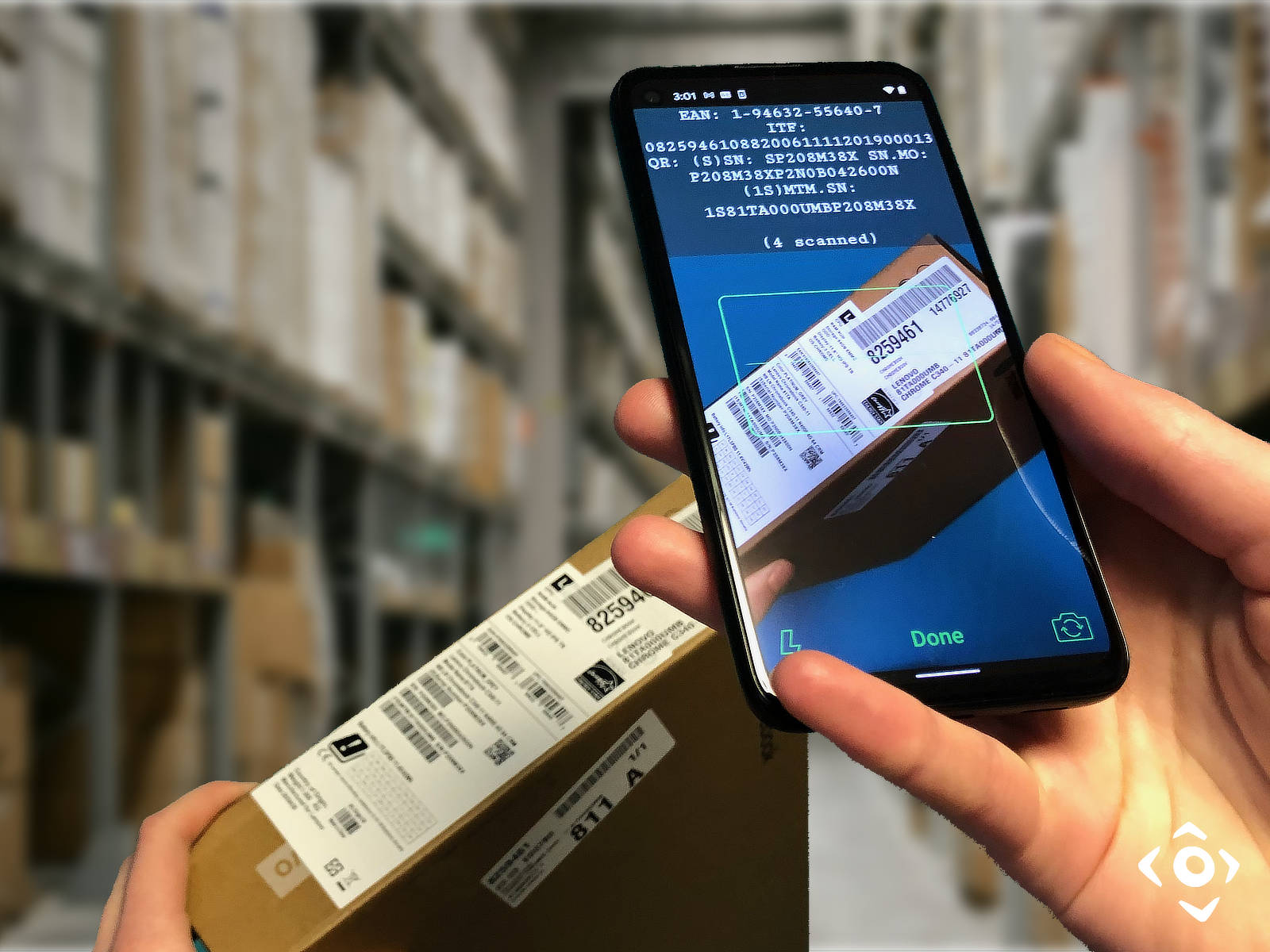
The free Vision Smarts app for iOS and Android showcases the latest version of our barcode scanner SDK. Test it on the exact barcodes your users will scan, including difficult real-world cases.


VS Barcode Reader supports batch scanning and reads UPC-A, UPC-E, EAN-13, EAN-8, EAN+2, EAN+5, GS1 Databar, Code 128, Code 39, Codabar, Code 93, ITF, Standard 2 of 5, Telepen, DataMatrix, and QR codes. Share via the standard action sheet.
Trusted since 2009, our SDK helps developers add barcode scanning to iPhone, iPad, and Android apps in minutes. It is designed to handle blurry, narrow, curved, dirty, crumpled, and damaged barcodes in challenging lighting conditions.
Download the Evaluation SDK on GitHub
The evaluation SDKs can be obtained from VS Barcode Reader Android evaluation SDK on GitHub and VS Barcode Reader iOS evaluation SDK on GitHub. Download, compile, and run the sample apps to test scanning performance and evaluate integration in your own app.
The evaluation versions are time-limited and transmit anonymous analytics. Production licenses do neither. SHA256 checksums for the current evaluation packages are listed below.
| VSBarcodeReader-iOS-EVAL-v7.3.1.tar.gz | b4b4f75a5a80c418830b78f7a20466de2f21ed95473f5d4ac21d4e2a26d33cf9 |
| VSBarcodeReader-Android-EVAL-v7.3.1.tar.gz | 4175f65ce3d9140110ee9475e9ebe6f58c899faa1d9fa8446013c0bb365b52ac |
Why This Mobile Barcode Scanner SDK Performs Better in Real-World Conditions
Reads Blurry Barcodes on Fixed-Focus and Auto-Focus Cameras
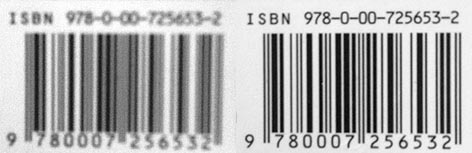
The left barcode is out of focus, as often happens with fixed-focus front cameras or slow-focus devices. VS Barcode Reader is designed to decode both blurry and sharp EAN barcodes using proprietary image processing and barcode recognition algorithms.
Key Features
- Live barcode scanning with a checkout-style user experience
- On-device processing with no network dependency
- Reads blurry UPC and EAN barcodes on iPhone, iPad, and Android devices
- Supports EAN+2 and EAN+5 add-on codes for books and magazines
- Supports Code 39, Code 93, Code 128, Codabar, ITF, Standard 2 of 5, Telepen, and all GS1 Databar variants
- Also supports QR Code and DataMatrix, including small and difficult codes
- White-label license with full control over the user interface
- No tracking, no ads, and no analytics in production builds
- Easy integration with a lightweight binary and minimal API surface
- Flat fee annual license with straightforward per-app pricing
- Compatible with supported iOS and Android devices
- Fully compatible with iOS 26 & Android 16, going back to iOS12 & Android 6
Supported Mobile Platforms
- iOS (iPhone, iPod Touch and iPad)
- Android (smartphones and tablets)
Supported Barcode Types
Our mobile barcode scanner SDK supports the 1D and 2D barcode formats most commonly used in retail, consumer goods, packaging, inventory, and logistics apps.
If built-in frameworks already meet your requirements, you may not need a commercial barcode SDK. This comparison shows where VS Barcode Reader is most useful: difficult barcodes, older devices, privacy-sensitive apps, and fully white-label deployments.
Barcode SDK Comparison: VS Barcode Reader vs Commercial SDKs vs Built-In APIs
VS Barcode Reader
Other Commercial SDKs
Built-in mobile APIs